Works with your speakers

The best music player app for Sonos speakers

Play the same song on these speakers and on every other speaker in your home - Sonos, Bluetooth, the TV, the PC - perfectly in sync, with an AI DJ that knows your music.

7 days free on every device · radio stays free forever

OmniSound Hub AI KROSS
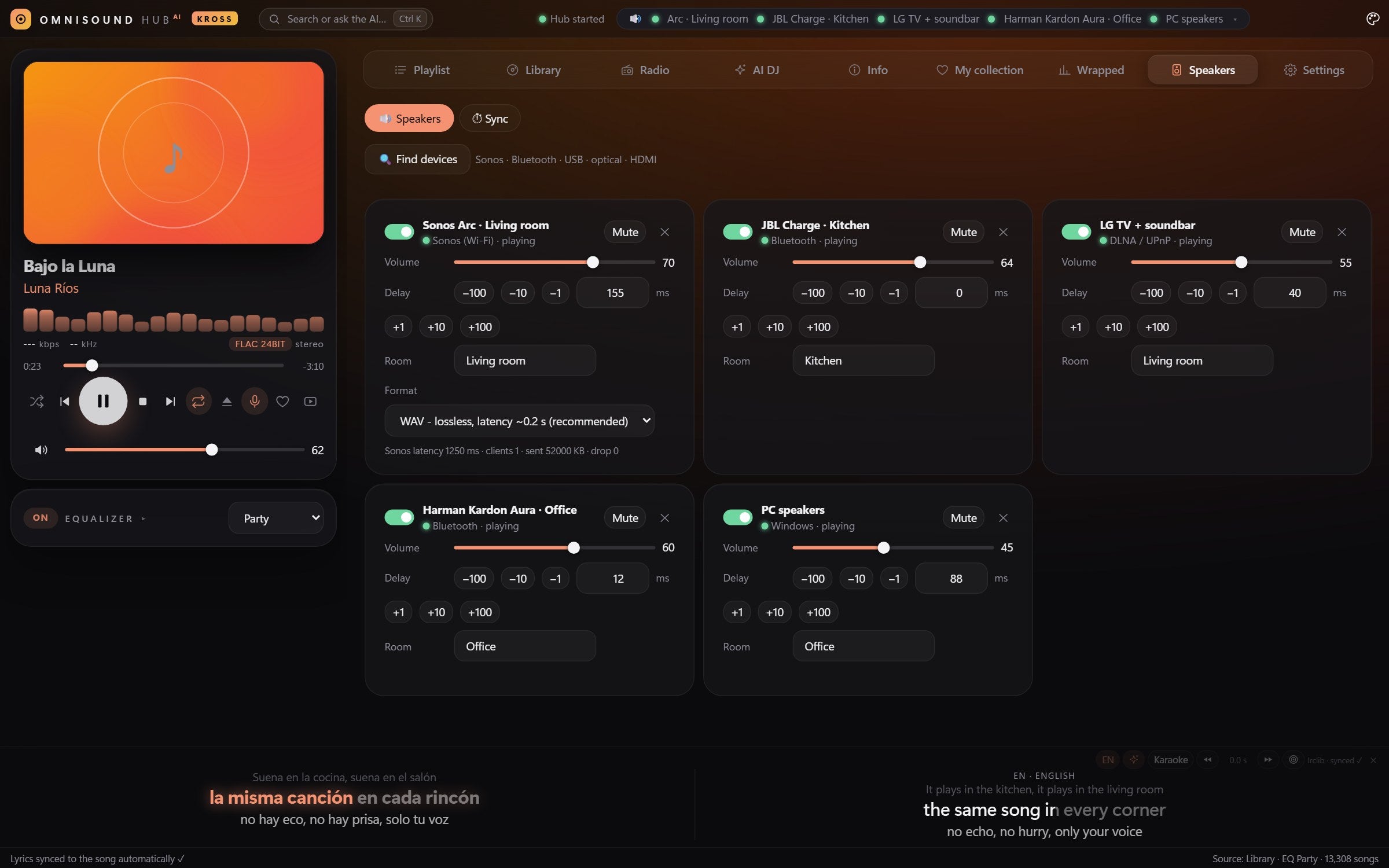
OmniSound playing on five speakers at once: Sonos, JBL, LG TV, Harman Kardon and the PC

OmniSound Hub AI KROSS plays the same song on your Sonos speakers and on every other speaker in your home - Sonos, Bluetooth speakers of any brand, the TV and its soundbar, the PC - perfectly in sync. It works with Arc, Arc Ultra, Beam, Era 100, Era 300, Five, Move and Roam, over Wi-Fi (native Sonos streaming).

Why Sonos owners use OmniSound

The Sonos app groups Sonos speakers beautifully - but only Sonos speakers. A Bluetooth speaker in the garden, the TV in the bedroom or the speakers on your desk stay outside the group. OmniSound removes that wall: it is one app that talks to every speaker the way that speaker already understands, and keeps all of them on the same beat.

How it connects to Sonos

OmniSound streams to Sonos over your Wi-Fi like the Sonos app does - lossless WAV by default, so FLAC files keep their quality. It measures how long each Sonos speaker buffers and delays every other speaker by exactly that much, so the kitchen JBL and the living-room Arc hit the same beat.

Tip: Choose the WAV format for Sonos in Settings → Speakers: it gives the lowest delay (about 0.2 s) and full quality. Use MP3 only if your Wi-Fi is weak.

The AI DJ plays your music on your Sonos

Say what you feel like hearing - “90s dance for a summer party”, “something calm for a rainy Sunday”, “more like this song”. The AI builds the playlist from your own library (NAS, PC or phone), never invents songs, and starts it on the speakers you choose. While it plays, the lyrics scroll in time - translated into your language - and the AI tells you the story behind the song.

Set it up in three steps

  1. Install OmniSound on your Windows PC, Android phone or tablet, or LG TV - every device gets 7 days free with everything included.
  2. Open Speakers → Find devices and add your Sonos, plus any other speakers you have.
  3. Run the one-click microphone calibration - and play. Every room hears the same note at the same moment.

Good to know

  • One licence covers a whole home: 1 TV + 1 PC + 1 Android device - 9.95 € per year or 24.95 € for life. The radio and podcasts stay free after the trial.
  • Your music stays on your own devices. OmniSound does not sell or include music.
  • Speakers that only support AirPlay or Chromecast are not supported yet.

Also see OmniSound with LG, Sony, Samsung, Bose, JBL, Harman Kardon.

Sonos is a trademark of its owner. OmniSound is an independent app and is not affiliated with or endorsed by Sonos.

Brand names belong to their owners; OmniSound is not affiliated with them. AirPlay- or Chromecast-only speakers are not supported yet.

Licence

Simple pricing, no subscription traps

7 days free on every device. After the trial the radio stays free; the library, AI, synced lyrics and videos need a licence.

Yearly

€9,95/ year
  • 1 TV + 1 PC + 1 Android
  • Every feature, AI included
  • All updates during the year
Best value

Lifetime

€24,95one payment
  • 1 TV + 1 PC + 1 Android
  • Every feature, AI included
  • All future updates, forever
Your licence key - it travels with your order and arrives by email:OMNI-····-····-····

Already bought? · Activate a TV · My licence

FAQ

Questions

Which speakers can play together?

Sonos, any Bluetooth speaker or headphones, the TV and its soundbar (HDMI/eARC), the PC's own outputs and DLNA/UPnP network speakers - in any mix, at the same time. Speakers that only support AirPlay or Chromecast are not supported yet.

How does the sync work?

Each speaker has its own delay. OmniSound measures it - automatically with a microphone, or by ear with a slider - and delays the faster ones so all play the same moment. Clock drift is corrected while the music plays.

Do I need to pay for the AI?

No. Gemini, Groq and OpenRouter offer free keys and the app shows how to get one. If you already use Claude or ChatGPT, you can use those too. Your key stays on your device.

Where does the music come from?

From your own files: a NAS, the PC, the phone, a USB drive through the PC, or music servers like Plex, Jellyfin and Subsonic. Plus 50 000+ free radio stations, podcasts and free music. OmniSound does not sell or include music.

What does one licence cover?

One TV, one Windows PC and one Android phone or tablet. If you change a device, move the licence from the app or from the 'My licence' page.

What happens after the 7-day trial?

The radio and podcasts stay free. The library, AI, synced lyrics and music videos need a licence.

Does it work without internet?

Yes - your library and the speakers on your network keep playing. The licence is checked now and then, and works offline for a month.

Which TVs are supported?

LG Smart TVs with webOS 4 or newer (2018+). On other TVs, use the PC or the Android hub with the TV as a speaker.

Turn your home into one big speaker

Try everything free for 7 days on every device. Then choose yearly or lifetime.